

Displaying related posts is a smart way for keeping your site visitors around and with thumbnails it is even smarter!
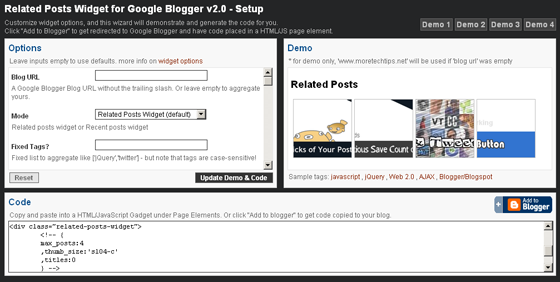
Check out this easy setup wizard
for demos and code generation. Also, to have code copied to your Blogger blog!
Few Notes
- Code consists of 2 important parts
- Including CSS and Javascript files (jQuery library & widget in that order). Each file only needs to exists one time on a page regardless of how many widgets you have on that page. You can include the Javascript files at <head> section or by the end of the page.
- Placing the container DIV where you want widget to appear, setting class attribute as "related-posts-widget" to have widget automatically loaded! And setting widget options either in an inner HTML comment or in a HTML5 attribute 'data-options'.
- Although previous parts are all you need, You can still call widget at document-ready on a HTML element identified by some selector and pass options in the method call.
- Plugin was also tested to work with jQuery v1.3.2 and v1.2.6, Just replace jQuery Javascript source to "http://ajax.googleapis.com/ajax/libs/jquery/1.3.2/jquery.min.js"
Or "http://ajax.googleapis.com/ajax/libs/jquery/1.2.6/jquery.js" - Post thumbnail is usually the first image you insert in the post and it is automatically extracted by Google Blogger and that image must be uploaded to PicsaWeb - directly or through Blogger post editor.
New Features
- Display related posts with/without thumbnails.
- Since, images added to Blogger posts are uploaded to PicasaWeb, you can use many custom thumbnail sizes.
- You can use one of 2 CSS styles to help you get started quickly.
- Display posts with transition effects or as a fixed list.
- Many transition options are available like opacity, width, height, font-size.
- Optional timeout technique is used to finish widget loading when one or more feed requests were not completed successfully, instead of waiting indefinitely.
- Thumbnails loading is delayed until widget has finished aggregating related posts to avoid loading extra images
- You can customize it by placing optional parameters -like custom animation- in a HTML comment or HTML5 data attribute.
- You can disable widget if current page is not a post page.
- Widget was rewritten as a jQuery plugin, use a typical jQuery call to load it or auto-load any number of div elements with "related-posts-widget" class in the same page.
Old Features
As in version 1.0, this widget..- Is easier. No need to edit your Blogger template.
- Is smarter. Posts are aggregated and sorted according to post tags that are already displayed in post page.
- Is optimal. It queries summary feeds of your blog instead of querying default feeds that return full contents.
- Can work as recent posts widget too.
- Can work with fixed list of tags instead of using current post tags.
 Web developer, jQuery plugin author, social media fan and Technology Blogger.
Simply awesome :) If you have time, then can some of your tutorial can you please explain, how you achieve the transition effects? Looking at the source code, I found that you almost do it like faking an animation effect from opacity 1 to opacity 1. It would be really nice to read from your tutorial.
@Swashata,
Thanks my friend.
Explaining the effects is on my mind :) Hope I will have the time to do it..
Great work Mike.
really good :)
@Asker,
Thanks my friend :)
hmmmm...its a full stylish
amazing...
thanks a lot for your creativity :)
@Mike
Great! Would be waiting for that :)
great....
i like it.... :)
thanks...
thanks good widget
Seemed really cool, although not for me- Seems the related posts are always the same ones. There's no variety too when I included it within each post.
@Anthony,
Can you give a sample url of the issue..?
wow. thx for such a great tool
cannot make it work:(
@SeerSucker,
Send me details about the issue..
how to apply the containerselector on this new widget?
i want it to be placed under my content, but above the comments
@gabanMorka,
You don't need that, you can just add the code to HTML widget under the post content..
If you still need to show the widget in some specific container, go to setup page and choose "jquery" in "widget loading" option from the left panel and see how the generated code uses an ID as the container selector..
If you need further assistance, email me
Great tool, but how to remove the post when being read, include showing at related post. Please help me, thx
@Christio,
I'm not sure what you need, can you email more details about the issue and URL of the blog?
Hi, I used this widget but its showing me only titles of my blog but i want to show the some part(text part)of blogs also. so can you please suggest me how can i do this?
@Chetan,
Can you explain your issue again, or email me for more details.. also, let me see a sample link..
I am using this widget in my website which is not uploaded yet. by using this widget i can see my blogs in my website but its showing me only image & title of my blogs but i want to show blog text also on my website. please give me some suggestion.
Thanks in advance......
Great plugin Mike !
But I have a problem using the "Post Pages Only?" option. On my stand-alone page the widget appears showing "loading.." inside it.
You can se an example of this at http://selogeek.blogspot.com.
Good point @CP,
You need to remove the "loading.." text inside HTML code of the widget..
Thanks for your help Mike, did as you said and it's better. I still have the empty widget border though.
You welcome @CP,
try doing few CSS changes on some div classes like [".main-inner .widget",".widget-content"]. try something like setting vertical padding to 0 in order to hide it when it is empty..
@Chetan,
Sorry that plugin doesn't display posts summaries.. maybe on next version..
ive tried a few of these things now and this is just another one that fails to work. i got the widget saying 'loading' and thats about it
@Aaronreaction,
email me sample url and more details so I could help you.
I do not have any problem in application of this HTML script.i am running 3 blog and i applied this for all my blog.and works perfectly.i just need to know that i want to Show posts from my another blog(i.e) my 1-st blog post should appear in 2-nd blogs related post ! is it possible pls replay soon !!
@Anonymous,
you can set plugin option "blog_url" to any Blogger blog address. But to get related posts from another blog, the 2 blogs should have common tags/labels. (In blogger, tags are case-sensitive!)
@Haz,
I check your blog and the plugin looks working fine.. If you have 2 specific posts with different labels and are showing the same related posts then please send me links to my email..
You should use one jQuery only on a page! Use latest version of jQuery that supports all the plugins you are using..
@Haz,
Have you tried to use jquery 1.3.2
<script src='http://ajax.googleapis.com/ajax/libs/jquery/1.3.2/jquery.min.js' type='text/javascript'></script>
@Haz,
I did a little change in the plugin to make it run with jquery 1.2.6
You don't need to change anything, the plugin is actually working on your blog now :)
@Haz,
please contact on my email as this is out-of-scope for this post..
I have tried to integrate to nmarketers.com. I have added the scripts in head and related post div just after post.body.
But it is getting stuck at Loading.. I can't see any related posts. Am I missing something?
Hi Dilip,
I replied to your email about that issue. Anyway, the problem was having more than one jQuery plugin included in the page..
Hello Mike,
Thanks, I guess your mail might have gone to spam filter :(. Yes there is already a jQuery in the page. So in this case, what can be done ?. How can I make the related posts plugin active ?
Dilip Vamanan
@Dilip,
you are including 4 jquery versions on your page, which is no good..
you should use 1 version only, I suggest using the latest one 1.4.2, if some plugin didn't work with 1.4.2 then use 1.3.2 or 1.2.6
order of including jQuery plugins and related CSS in any page should be like this:
1) Related CSS files
2) jQuery library
3) any jquery plugins
Hello Mike,
Thats right, I was using jQuery in another plugin. Now to just verify I have removed that. In the HTML source, there is only one jQuery version include.
But still no related posts ;(
site name : nmarketers.com or in any other page.
@Leadership,
but the jQuery plugin itself is not included :
<script type="text/javascript" src="http://blogger-related-posts.googlecode.com/files/jquery.related-posts-widget-2.0.min.js"></script>
it's great, thanks
Excellent Work. This works very well. Thank You so much.
Simply the best around. I have a 5 years old blog and the widget crawls like a charm.
Help! Perhaps I'm doing something wrong... Instead of "Related Posts" I'm getting "Recent Posts." I made sure to mark "Related Posts" in the setup (fixed tag/label), and I'm still only getting "Recent Posts." Also, I'm not getting thumbnails, just links (titles). Thanks in advance. :-)
@RoadTested,
Does the page includes post labels?
Can you send me your link to check it out..
vertical appearance on my blog, how to display horizontally??
Thank you Mike
@Galatema,
1) include CSS file at the start of widget code..
<link type="text/css" href="http://blogger-related-posts.googlecode.com/svn/v2/style1.css" rel="stylesheet" />
2) set option "title" to 0 to hide post title..
,titles:0
try this.. for further help please email me.
Great wiget, thanks!
But I have a same problem as Galatema: they displays vertically )
You recomendations does not work...
@tcokli,
can I have the url?
Sure
http://tcokli.blogspot.com/
@tcokli,
try to set option "title" to 0 to hide post title..
,titles:0
For further help please email me..
thank you! i got it!
Thanks for this great widget.
When I place it as a HTML/JavaScript gadget on my sidebar, it shows up very well.
But I need it to appear below my post. What do I need to do to place it there?
@The Lost Observer,
You can place code in another HTML/JS widget below the post.
If you are familiar with Blogger template, you can manually place the code there.
For further assistance, please email me.
Great plugin......
i m getting a problem to install this plugin problem is that it showing me thumbnails when i insert code directly in my template but if i use same code in html/javascript element it will not showing any thumbnails
where i am doing wrong can you plzz help me out
i want that it will not show me any thumbnail when i use the code in my template directly
my blog address is allmytutorials.blogspot.com
@Sudhir Dudeja,
You need to set "thumbs" option to 0 as in demo 1.
Also, check plugin options for more info.
@mike
thx for your reply
i did it .
i did every thing but i am not able to get transition effect with no thumbnails when i insert that code directly in my blogger.But when i add that code to html/javascript element i get transition effect with no thumbnails .
i want to add these plugin below my post so i need to insert code directly in it.
@Sudhir,
You need to use option "show_n".. Please, refer to plugin options for more info.
Wowww perfect widgets , it reallty fits on my template , ,
Hi, i tried getting this widget but once I had put it onto my blog nothing came up, all that I can see is "loading..." on the sidebar. If you could help me out i would really appreciate it!
My blog is http://www.daybydiva.com/
@Sanam,
The problem is that jQuery script is included twice in your blog.. You need to include it once in your page <head>
* For more info please email me..
sir this related post widjet not working it seem recent post please tell me about this query from http://todayprice.in how to add related post widjet
Hi Anonymous,
The widgets works fine in homepage since posts labels(tags) are their, but in post page labels are missing! Widget needs those labels to get related posts!
Hi
Thank's for widgets
in I tried the widgets Demo 3 I have a variation of picture size.
And I want to remove a Related Title
@TheGame,
please email more details on the issue and your url
Hi Mike
ok this my blog I add widgets Related post demo 3
http://games-for-game.blogspot.com/
as you see it, there is a variation of size.
I tried to make it correct but I have not found the solution.
exemple for size Width: 300px And Height: 150px
@TheGame,
try a cropped thumb_size like this 's104-c', it will return images exactly 104x104 pixels..
For info, plz refer to plugin options
http://code.google.com/p/blogger-related-posts/wiki/Options_v2
I couldn't get that working on my blog
@Smart,
please email me more details and your url..
Thank you Mike, very clever solution.
@Jasmine,
you are using many jQuery scripts in the same page, you should pick the version that works with all plugins you have..
please email for further assistance.
@Jasmine,
you need to check your template or html widges for jQuery scripts and eliminate them.. and include just one jquery script at the head of your template. Choosing the right version is by try & error!
please email me for further assistance.
one of the greatest widgets i ever find.. THANK YOU !
@G Raju,
please email me your issue in details..
Hi, I love this widget! It looks great when I add it as a widget in Layout mode, without titles, horizontally, and place it under the post as a widget. However, I want the 'Related Posts' to show up in between the shared buttons and the comment section, not under the entire thing. I added the code, straight up copied and pasted it...but when I did that the titles of my related posts show up, even though they didn't show up the other way. I'll leave them there for a day or two so you can see but then I'm taking them down. The code reads:
,thumb_size:'s104-c'
,titles:0
so I'm not sure what's wrong?
I'm at focusonthebeer.com
@Eric,
Not sure what is the issue since you removed the widget..
You can't put it between post and comments unless you edit the template and add it manually.
If need further help, plz email me.
Thanks so much for the widget! I'm using it on my site and it's very helpful
Could you please set a condition to display the text "None" if there are no existing related posts? Often I create posts with new labels and as there are no related posts, only the "Related Posts" title is displayed with nothing below, which looks awkward. Thanks again!
@Mario,
Thanks for your feedback..
Try to replace the text "loading.." in widget code with "none" so it will show none when no related posts were found.
This is a cool Widget for the Blogger blogs, this is the one i was looking for my blog Inity Jobs.
Thanks a ton!
I have problem with this. I can't remove it on home page. I want it only show on detail of articles page.
Amazing job ... thanks :)
Wow..great works bro :) Thanks for it!
Please tell me!!.How can I change the number of posts more than 25 posts?